Docs / Panel reference / Constraints
Constraints
Spatial pins that steer the AI — a sub-card inside Text to Motion.
A collapsed sub-card inside Text to Motion. Constraints are spatial pins
that steer the AI — they tell the model "the character's hand is here at
this frame" or "follow this path." They appear as markers in the viewport and
pins on the timeline. The header pill shows how many are active (e.g.
0 active).
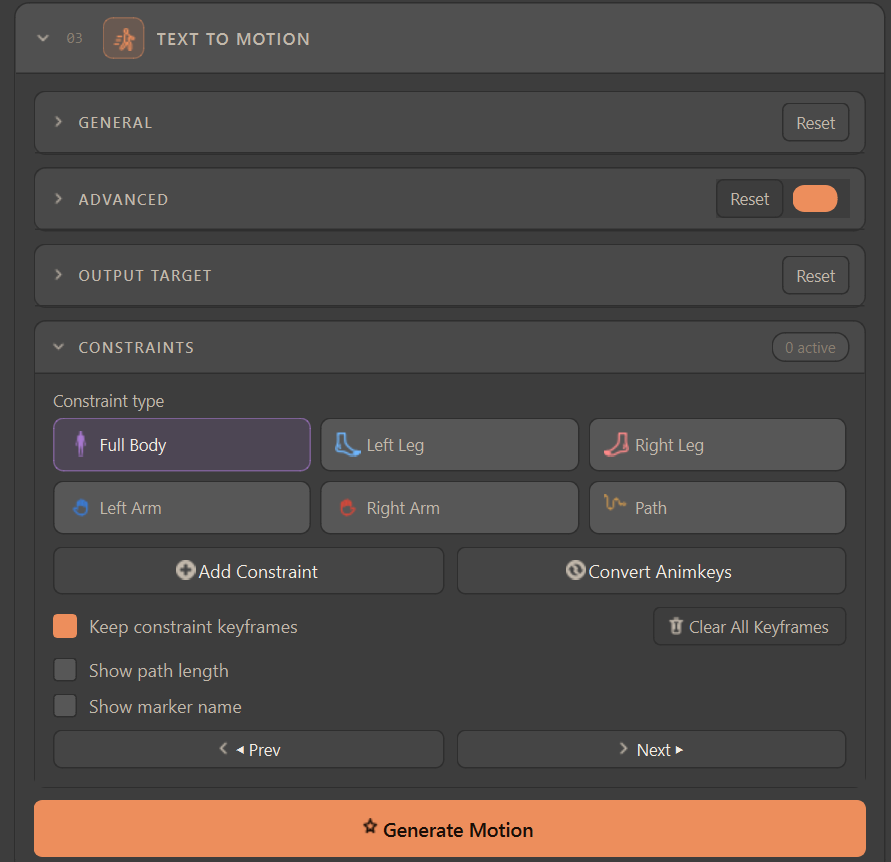
#Constraint type (3×2 picker)
| Type | What it pins |
|---|---|
| Full Body | The whole-body pose shape (joint rotations) at a frame. The root stays free so the character can still travel and reach the pose. |
| Left Leg / Right Leg | Places the corresponding foot effector at an exact position. |
| Left Arm / Right Arm | Places the corresponding hand effector at an exact position. |
| Path | A ground trajectory (waypoints on the XZ plane) the character's root should follow. |
#Actions
| Control | Description |
|---|---|
| Add Constraint | Captures a constraint from the current Control-Rig-driven pose at the playhead. What you capture is what comes back: the pose's height and position are sent relative to the ground plane and restored on apply, so a pin lands where you put it. A new Path waypoint lands under the hips at that frame — where the character actually stands — and only when that spot already holds a waypoint is it nudged beside its neighbour, so a rig without motion no longer piles its waypoints onto one point. |
| Convert Animkeys | Builds constraints from existing animation curves. |
| Keep constraint keyframes | Preserves the keyframes used to author the constraint. |
| Clear All Keyframes | Removes authored constraint keyframes. |
| Show path length / Show marker name | Display-only toggles for Path markers — never affect the generation request. |
| ◀ Prev / Next ▶ | Jump the playhead to the previous/next authored constraint frame (wraps at the ends). Also [ / ] over the timeline. |
#How types combine on one frame
Different constraint types can share a frame, within limits. A Path waypoint coexists with anything; the four arm/leg effectors coexist with each other and with Path; and a Full Body pose coexists only with a Path waypoint — never with an individual arm or leg pin on the same frame, since the full-body pose already defines those limbs.
When a Path waypoint and a hand/foot pin land on the same frame, which one wins is set by Path waypoint wins over same-frame hand/foot pins in Settings → Extra options — on a current Animatica Cloud server the result is the same either way (see below).
#The Path line
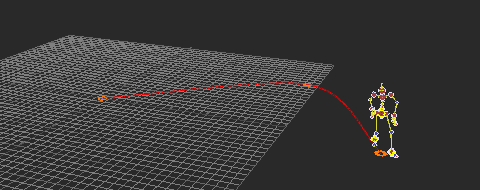
The movement line drawn through Path waypoints is a smooth curve (a Catmull-Rom spline through the waypoints, the same bend 3ds Max gives the same path), not a chain of straight segments — two waypoints still draw a straight line. Dragging a waypoint reshapes the four segments around it live. The line is a preview of the trajectory you are asking for; what the server receives is the waypoints, not the curve.
#How pins reach the model
Two things happen to a request that carries pins, and neither needs a setting.
- A start anchor for Full Body pins. When a Full Body pin sits later in the range, the tool also pins the pose the character is in at the request's first frame, so the body walks to your pin instead of gliding to it. If you pinned the start frame yourself, your pin is used and the anchor stands aside — the Console says so. (Before 1.1 the two collided on the retarget path and the generate failed with "Times must be in strictly increasing order".)
- Hand/foot pins are built from the motion itself. Since the September 2026 server update a request with hand/foot pins generates twice: the first pass runs without them and gives the motion the pins are built against, the second runs with pins that carry that motion's body — hips on your authored waypoint, the pinned limb brought to its target by IK. Pins are anchored to the motion on the neighbouring constrained frames, so a one-frame pin no longer bends the arm for the whole clip, and the result no longer depends on the order the constraints are listed in. The cost is a second model pass whenever pins are present; a request without pins still runs once. A target out of the limb's reach now points the arm at it and leaves the hips on the path — which is what the old drift used to hide.
Start here — New to constraints? Begin with just two: Full Body and Path. Full Body pins the pose you want the character to hit, and Path defines where it walks — together they steer the overall performance without micromanaging individual limbs. Add the arm/leg effector constraints later, only when you need a hand or foot in an exact spot.
Viewport safety — The markers live under an
Animatica_Constraintsnull with one group per character. Those container nulls (and the Path movement line) are transform-locked and not pickable, so a stray click-drag or key in the viewport can't move the whole constraint set or knock the line off its waypoints. The markers themselves stay fully selectable and draggable — that is how you move a constraint in space; the Path line reshapes only through its waypoints. In Compact layout the sub-card keeps the type picker and Add Constraint; the rest is in Full.
Good to know — Constraints are optional — a plain text prompt generates fine on its own. Use constraints when you need precise placement (a foot on a mark, a hand on a prop) or a specific travel path. Above ~20 constrained frames of one type, the tool warns you're getting heavy; there is a hard server cap too.