Docs / Panel reference / Skeleton
Skeleton
Card 01 — create the canonical rig, adopt one of your own, or point the plugin at a rig already in the scene.
Chooses the rig the generated motion is keyed onto. The header pill reads
not created until a rig is ready, then ready.
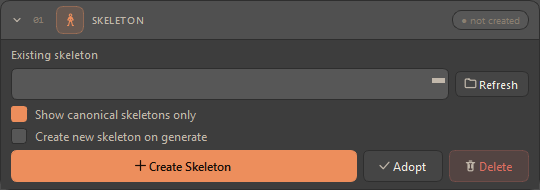
| Control | Description |
|---|---|
| Existing skeleton + Refresh | Lists the skeleton roots in the scene, so you can target a rig that is already there. Refresh rescans. Nothing is auto-picked for you: if the previous selection is gone, the picker shows blank rather than silently choosing a rig you never chose. An imported rig whose bones hang under a helper is listed once, by its joint root — the helper above it is not offered as a second rig. |
| Show canonical skeletons only | On by default — the list shows only rigs the plugin built. If the filtered list comes out empty, the plugin falls back to showing all roots rather than showing you nothing. |
| Create new skeleton on generate | Build a fresh rig as part of the next generation instead of reusing the current one. |
| Create Skeleton | Builds a rig for the model selected in Model, rooted at Hips, with every joint named animatica:<joint> — animatica:Hips, animatica:Spine, and so on. Which rig, and why, is written to the Console every time — see below. |
| Adopt | Makes the selected rig pipeline-ready: stores its current pose as the bind pose, plus hip height and its name prefix. |
| Delete | Removes the selected rig, the constraint markers the plugin attached to it, and its prompts and pins on the Prompt Timeline, after a confirmation. It cannot be undone. |
In the Compact layout the card shows the picker, Create Skeleton and Delete only; the filter, the create-on-generate checkbox and Adopt come back in Full. See Compact and Full.
There is no Namespace field in 3ds Max — a colon is just a character in a
Max node name, so the animatica: in front of every built joint is
bookkeeping the plugin uses to find and delete its rig, not something you name.
A rig of your own keeps whatever prefix its joints carry.
#What Create Skeleton builds
The plugin asks the server which skeleton the selected model is trained on, then applies one rule:
- If every joint of that skeleton exists in the built-in
soma77rig, the built-in rig is built — 77 joints. This is the case forkimodo-soma-rp, whose 30 joints are 30 ofsoma77's. The rig keeps the fingers, the separate eyes and the jaw the model never predicts but you still pose and skin. - Otherwise the server's own skeleton is built, joint for joint — the case
for
ardy-core-rp, whose 27-joint layout uses names of its own.
The cost of the first case is deliberate, and the Console says so when it happens: the server's retarget gate compares joint lists verbatim, so a 77-joint rig generating on a 30-joint model goes through the server's retarget hop rather than the fast path. The hop is supported — Preserve height and your pins travel through it — but it is a retarget, and a server without a retarget model refuses it.
Three fallbacks, each logged with its reason rather than done quietly:
- No server reachable, or not signed in — the built-in
soma77rig is built anyway. An offline Create is better than no Create. - The selected model is not served — the rig is built for the first model the server does advertise, and the Console names both models.
- The model's skeleton cannot be built as a hierarchy — back to
soma77.
#Reusing a rig that is already there
If an animatica:* rig already exists in the scene, Create Skeleton
reuses it — but only after checking its shape. A rig built for one model is
rooted at Hips just like every other, so a name match alone is not enough
evidence that the rig is the right one.
If joints the build needs are missing, the plugin refuses. It names how many are missing, gives a few examples, and tells you what to do: delete the existing rig and create it again. Extra joints are fine — a rig carrying more than the build needs is exactly what the first rule above produces, and a prop bone under the hips is not a reason to refuse.
#Adopting your own rig
Adopt is you asserting this pose is the rest pose, so it overwrites any stored bind pose unconditionally. It works two ways:
- from the picker, for a rig the plugin recognises; or
- from the viewport selection — select any node of the rig and the plugin climbs to the top node and adopts from there. This is the escape hatch for an imported rig whose joint names the detection does not recognise.
Adopt deliberately does not mark the rig canonical, so an adopted rig stays out of the Show canonical skeletons only list. That is by design: it keeps rigs you brought in distinct from rigs the plugin built.
Two shapes of imported rig are worth naming:
- A rig rooted at Hips, with several bones under the root. Skip top joint when sending hierarchy is on by default and exists to drop a dummy above the hips; on a rig whose root is the hips it would have nothing to skip. The plugin checks first and sends the hierarchy with its root, and the Console says so. Adopt works with the default settings.
- Bones under a rotated, scaled parent helper — the shape of a rig
exported from another application, 77 bones under an
Armaturedummy. The picker lists the joint root, and Adopt reads the parent's frame once, at frame 0. A parent helper that carries animation of its own is outside what Adopt supports.
Where an adopted rig's prefix comes from — it is read off the rig's joints, not typed: the part of a joint name before a
:, or before a_. A rig with neither is stampedanimatica. Because it comes off the joints, a rig whose root is a helper still gets the prefix its bones carry.
A pick that is not a rig is refused — a hierarchy of fewer than three joints cannot be a character. If the node you picked has no bones under it (a container or helper standing above the rig), the plugin refuses before anything reaches the server, names the node, and asks you to pick the rig's own root joint instead.
#Each rig has its own timeline
Prompts and constraint pins belong to the rig picked here. Switching the picker switches the ruler of the Prompt Timeline to that rig's prompts and pins; the previous rig's stay where they were. The identity is a stamp on the rig that survives save, load and renaming, so a rig you rename keeps its prompts.
#When your rig is not the model's rig
Your rig goes on the wire as it is, and the server decides whether a retarget is needed — the plugin does no retargeting of its own. Two outcomes are worth knowing about:
- If the server carries a retarget model, it retargets and generation proceeds.
- If it carries none and your rig does not match the model's canonical skeleton, the plugin refuses rather than producing something wrong: "this server does not support retargeting — use a rig that matches the model's canonical skeleton (Skeleton → Create), or a server with a retarget model". Press Create Skeleton and generate onto the canonical rig, or point the plugin at a server that has a retarget model.
The route through that decision is the Retarget route setting in Settings → Non-canonical rigs; leave it on Auto.