Docs / Panel reference / Text to Motion
Text to Motion
Card 03 — the generation request itself: parameters, output placement, and the Generate Motion button.
The generation request itself. The prompts live on the Prompt Timeline; this card holds the parameters and the button that sends them.
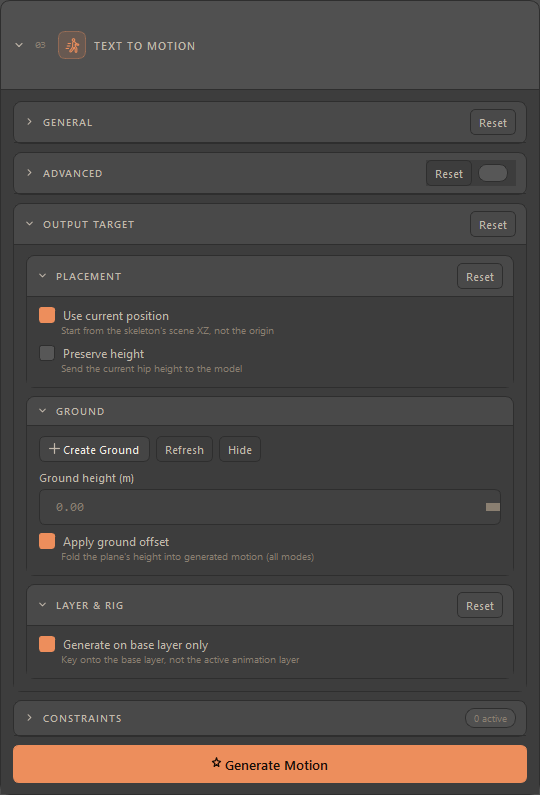
Each group carries its own Reset, scoped to the fields that group owns — a reset in one group never disturbs another.
In the Compact layout the card shows General, Placement, the Constraints sub-card and the Generate button; the whole Advanced group and the Ground and Layer & Rig blocks fold away, without losing their values. See Compact and Full.
#General
| Control | Description |
|---|---|
| Duration | Read-only: how long the current timeline content runs. |
| Max single prompt | A fixed reminder that one prompt block covers at most 10 s. |
| Diffusion steps | Quality against time: Draft (100), Standard (300), Fine (500), or Custom…. |
| Custom diffusion steps | Revealed by the Custom… preset; accepts 1–1000. Above 500 a warning appears — the server caps steps at 500 and may reject higher values. |
| Seed / Random | Fix a seed to reproduce a result, or tick Random to vary it. The seed field greys out while Random is on. |
Honest presets — if a saved step count does not match a fixed preset, the dropdown shows Custom… and the number verbatim. The preset label never claims a value that is not the one being sent.
#Advanced
Off until you flip the toggle in the group header. The Reset here restores the parameters but deliberately leaves the toggle alone, so a reset does not collapse the panel you are editing.
| Control | Range | Meaning |
|---|---|---|
| Num samples | 1–8 | How many candidate motions the server samples for the request. |
| CFG type | Separated / Regular / Nocfg | How the guidance is applied. |
| CFG weight (text) | 0–10 | How strongly the text steers the result. |
| CFG weight (constraint) | 0–10 | How strongly your constraints steer it. |
| Transition frames | 0–30 | Blend length between consecutive prompt blocks. |
| Initial heading (deg) | 0–360 | Which way the character starts facing. |
| Server post-processing | on / off | Runs the server's own pass (root-drift correction) over the sampled motion. On by default. |
| Root margin (m) | 0–0.2 | Horizontal slack for that correction. Greys out with the box above it. |
Root margin is not on the wire — the value is collected and remembered, but it is not sent. It is documented here so a number you typed is not mistaken for something the server acted on.
#Output Target
In 3ds Max there is exactly one target: the scene holds one animation, and a generation replaces it. Because there is nothing to pick between, the mode picker is not shown at all — the timeline header simply reads Mode: Replace.
#Placement
| Control | Description |
|---|---|
| Use current position | Start from the skeleton's scene XZ and facing rather than from the origin. The rig's facing is captured along with its position. |
| Preserve height | Send the rig's current hip height to the model, so the motion is generated at that height rather than shifted afterwards. It is sent as a hips-only anchor at the first frame, and it travels through the server's retarget hop too, so a rig that retargets keeps its height as well. |
Placement stays on screen in the Compact layout: where the motion starts is a workflow question, not a knob.
#Ground
A movable ground-plane object whose height is folded into the generated motion.
| Control | Description |
|---|---|
| Create Ground | Spawns the plane, or finds the existing one. |
| Refresh | Pulls the plane's live height into the Ground height (m) field. |
| Ground height (m) | Editing it moves the plane. The plane is the source of truth and the field is a mirror, so it stays disabled until a plane exists. |
| Hide / Show | Toggles the plane's visibility; the button label follows the plane's actual state. |
| Apply ground offset | The master switch for the fold itself. It is policy rather than a plane control, so it stays available even with no plane in the scene. |
#Layer & Rig
| Control | Description |
|---|---|
| Generate on base layer only | Key onto the base animation layer regardless of which layer is active. This is key placement only — additive layers above still show. |
3ds Max exposes native animation layers, which is why this switch is here and why it is the only one in the group.
#Generate Motion
Builds one request from every prompt block on the timeline and sends it. While it runs, a progress row below the card shows the phase, an indeterminate bar and an elapsed clock, and the card itself is disabled so a second click cannot race the first.
The same run is started three ways: Generate Motion here, Generate in
the timeline header, or Ctrl+G with the mouse over the timeline.
The hidden-options line — in Compact, a line under the button names any folded-away setting that differs from its default, up to three by name and the rest as a count, ending "switch to Full to review". It covers this card's Advanced knobs, Ground and Layer & Rig, and the Settings and Single Pose options Compact hides. No line means everything hidden is at its default.
Before the request leaves, the plugin says in the Console whether the server will retarget it — a rig that is not the model's canonical skeleton, including the 77-joint rig Create Skeleton builds for a 30-joint model, goes through the server's retarget hop.