Docs / Getting started / Overview
Overview
What the Animatica plugin for 3ds Max is, what it does in your scene, and how this host differs from the others.
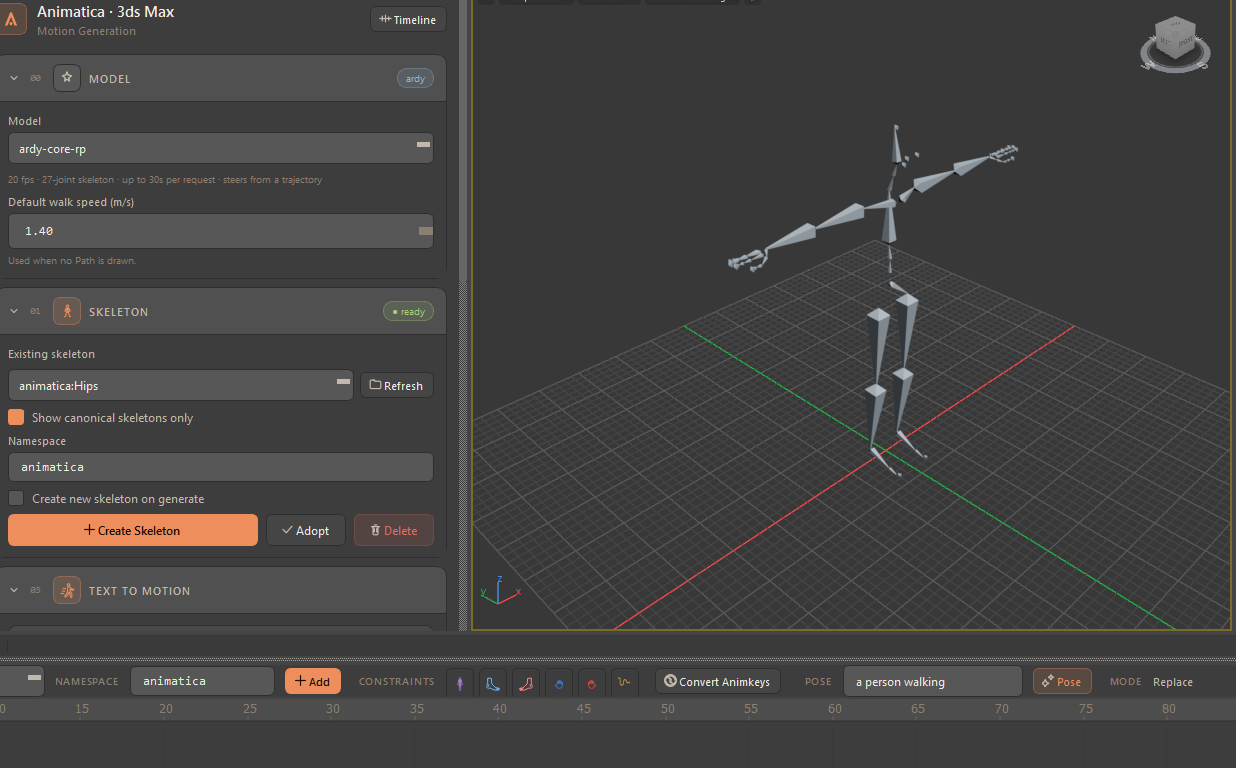
Animatica for 3ds Max is a dockable tool window that brings motion generation into your Max scene. You describe the motion you want in plain language, and the plugin sends that request to an MMCP (Motion MCP) server — a local one on your machine, or Animatica Cloud — and keys the returned animation onto a skeleton in your scene.
#What it does in your scene
- Builds or adopts a rig. Create Skeleton builds a rig for the selected
model — the built-in
soma77layout, 77 joints rooted at Hips, whenever the model's joints all live inside it, and otherwise the exact skeleton the server publishes for that model. Or you can point the plugin at a rig that is already in the scene. - Generates from text. Prompt blocks are laid out in time on the Animatica Timeline, and one generation turns all of them into a single request.
- Steers the result with constraints. Six types: a full-body pose shape, four hand and foot effector pins, and a Path of ground waypoints.
- Generates a single pose at the current frame, from one short prompt.
- Loads motion from a file —
.npz,.bvhor.glb— from a window of its own. - Keeps each rig's prompts and pins apart. A scene with several rigs has a timeline per rig, and switching rigs switches what is on the ruler.
Export is Max's own: File ▸ Export, and pick FBX. The plugin has no export path of its own, but it does ride on Max's export callbacks so a rig it built reads correctly in other applications.
#Three things worth knowing
- The server does the generating. The plugin never launches a server and never generates locally; without a reachable server nothing can be produced.
- The server also decides retargeting. Your rig goes on the wire as it is,
and the server's own gate picks the fast path or its trained retarget model.
That includes the rig Create Skeleton builds: a 77-joint
soma77rig generating on a 30-joint model is retargeted by the server, on purpose, so the rig keeps the fingers, eyes and jaw the model never predicts. If a server carries no retarget model and your rig does not match the model's canonical skeleton, the plugin refuses in words rather than producing something wrong. - Max is Z-up; the protocol is Y-up in meters. The conversion is done for you in one module, and your scene unit is read at runtime — you do not have to work in centimeters.
#How this host differs from the others
The plugin registers itself with the shared Animatica core under the host key
max and declares exactly one capability: animation layers, which is
real and detectable in Max. Capabilities default to absent, and the core gates
its features on them rather than on a host's name — so anything that needs a
capability this host does not declare is simply not in the window:
| 3ds Max | MotionBuilder | |
|---|---|---|
| Scene axis | Z-up, converted in one module | Y-up, no conversion needed |
| Scene units | asked at runtime, never assumed | — |
| Retargeting | decided by the server | decided by the server |
| Named animation containers | none — generation always replaces the scene's one animation | present |
| Character system / control rig | none — 3ds Max has no equivalent | present |
| Live drive (ARDY streaming) | not implemented — ARDY still generates offline through Animatica Cloud, retargeted by the server both ways | present |
| Layout | Compact and Full, switched in the window header; no menu item for it | Compact and Full, plus a menu item |
Because Max holds one animation, there is no output-mode picker: the timeline header simply reads Mode: Replace. The one capability the host does declare is why Generate on base layer only exists in the Text to Motion card.
#Where to go next
- Requirements and Installation — get the plugin running.
- First launch — the Animatica menu, and pointing the plugin at a server.
- The tool window — a map of the numbered workflow cards, and the Compact and Full layouts.
- Skeleton — what Create Skeleton builds for each model, and how to bring in a rig of your own.
Verified against animatica-3dsmax-plugin@7abdc2e